

When website owners look to improve load times, installing a caching plugin is usually the first recommendation they encounter. However, treating caching as a simple plugin setting leads to confusion when site speed remains sluggish.
As discussed in our primary guide on WordPress Speed Optimization, caching operates across multiple distinct layers. Understanding how these layers interact is key to building a fast, scalable web application.
Here is a technical breakdown of page caching, object caching, and server-level caching for WordPress.
Page Caching: Eliminating PHP Execution
By default, WordPress is a dynamic Content Management System. Every time a visitor opens a page, the web server executes PHP scripts, queries the MySQL database for content and settings, compiles the HTML output, and returns it to the visitor’s browser.
Executing this full stack for every request wastes CPU resources. Page caching intercepts this process.
How Page Caching Works
When the first visitor requests a page, the caching engine saves the final compiled HTML file to disk or RAM. When subsequent visitors request that exact page, the web server serves the pre-rendered static HTML file directly.
By bypassing PHP parsing and database queries entirely, page caching reduces response times from 1,000+ milliseconds down to 20 to 50 milliseconds.
Popular plugins like WP Rocket, LiteSpeed Cache, and W3 Total Cache excel at managing page cache files, clearing caches automatically when posts are updated.
Server-Native Page Caching: Nginx FastCGI & LiteSpeed
While WordPress plugins handle page caching effectively, server-level page caching is even faster.
Nginx FastCGI Cache and LiteSpeed Cache Engine save compiled static HTML files directly at the web server layer. When a request arrives, Nginx serves the HTML response directly without invoking the PHP-FPM process or touching WordPress core.
This eliminates PHP overhead completely for cached requests, allowing a basic cloud server to handle 1,000+ requests per second without crashing.
Object Caching: Accelerating Database Queries
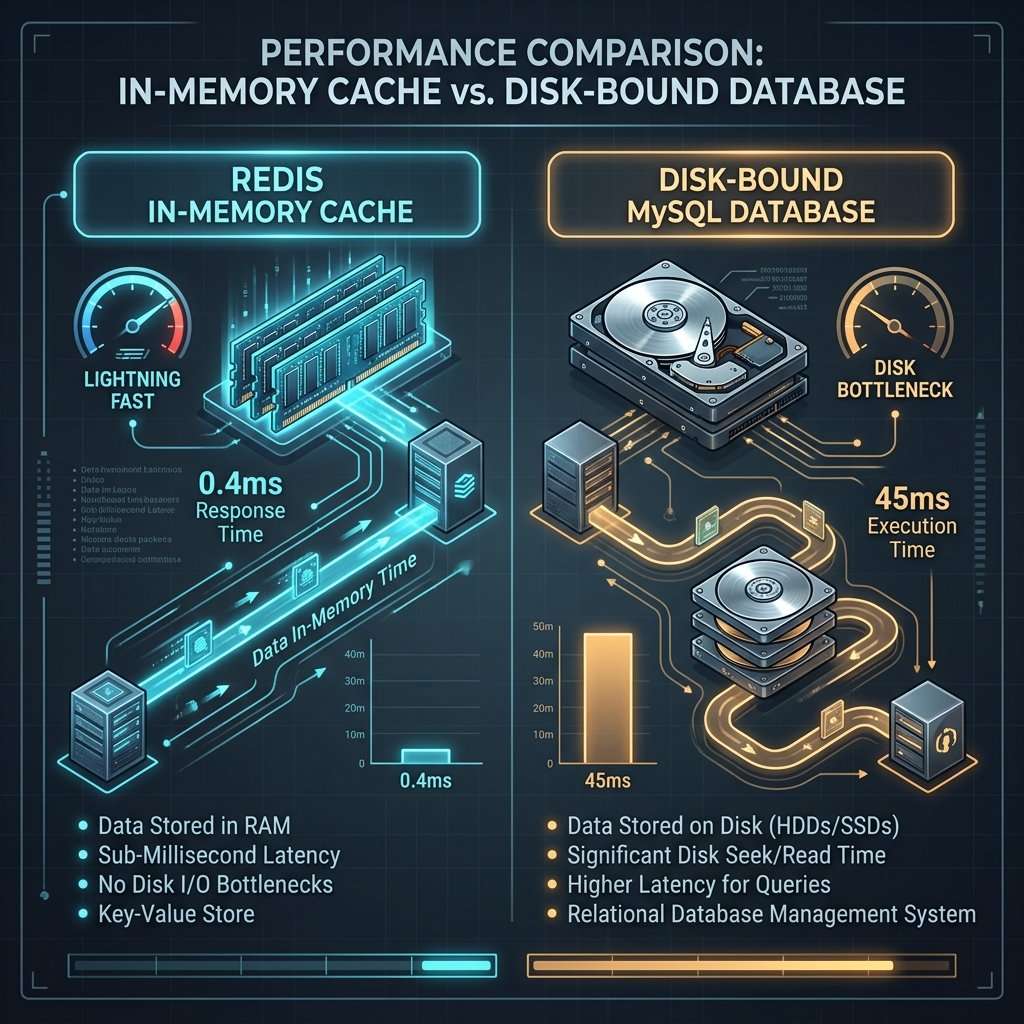
Description: Flowchart comparing database query round-trip to disk (350ms) versus Redis RAM in-memory retrieval (2ms).
Page caching works wonders for static content (like blog posts or brochure pages). But what happens on dynamic pages where content cannot be cached as static HTML?
For logged-in users, WooCommerce shopping carts, membership dashboards, or search result pages, page caching must be disabled. This is where Object Caching becomes critical.
The Role of Redis and Memcached
During a single page load, WordPress executes dozens of database queries to retrieve post metadata, site options, and user permissions. Object caching stores the results of these individual database queries in memory (RAM).
When WordPress requests the same metadata again during subsequent executions, it retrieves the query data instantly from memory via Redis or Memcached, bypassing disk reads to the MySQL database.
On high-traffic WooCommerce stores, deploying persistent server-side Redis object caching is often the single most impactful optimization possible. To learn how server infrastructure enables object caching, read our guide on How to Choose the Right WordPress Hosting for Speed.
Browser & HTTP Edge Caching
The third caching tier occurs outside your origin web server entirely:
Browser Caching
Browser caching uses HTTP response headers (Cache-Control, Expires) to instruct the visitor’s browser to store static assets (images, CSS files, JavaScript bundles) locally. When the user navigates between pages on your site, their browser loads these assets from local disk storage instantly.
Edge / CDN Caching
Edge caching moves your static page cache to a global network of CDN servers (such as Cloudflare Enterprise or Fastly). When a user in London requests your site, Cloudflare serves the cached HTML from its London edge node, eliminating trans-Atlantic network latency.
Cache Invalidation: The Challenge of Stale Content
The primary difficulty with aggressive caching is cache invalidation. If you update a product price or publish a blog post, visitors must see the updated content immediately.
Poorly configured caching setups often suffer from:
- Cart items disappearing or caching across different user sessions.
- Admin edits failing to appear on the frontend until manual cache flushes.
- Stale nonce tokens breaking contact form submissions.
Excluding dynamic pages (/cart/<em>, /checkout/</em>, /my-account/*) from page cache and using proper cache purging rules prevents these issues.
If your dynamic site or WooCommerce store suffers from caching conflicts or slow database execution, our team can engineer custom caching solutions. Explore our Website Speed Optimization Services or consult with our Custom WordPress Development specialists.
Frequently Asked Questions
Can I run two caching plugins at the same time?
No. Running multiple page caching plugins simultaneously causes plugin conflicts, duplicated header instructions, and visual layout breakages. Choose one reliable caching plugin or rely on server-native caching (such as LiteSpeed or Nginx FastCGI).
Does Redis replace page caching?
No. Object caching (Redis) speeds up database query retrieval during PHP execution. Page caching bypasses PHP execution altogether. High-performance WordPress architectures utilize both concurrently.
How do I prevent logged-in users or WooCommerce carts from serving cached pages?
Set explicit cache exclusion rules in your web server or caching plugin for cookies like woocommerce_items_in_cart, wp_logged_in_*, and session IDs. This ensures logged-in admins and shoppers always receive dynamic, real-time PHP rendering.
Need to configure enterprise object caching or fix WooCommerce cache collisions? Our team configures custom server-level caching stacks for complex WordPress builds. Contact Alexander Online Media today.


