

Relying on your CMP dashboard to report zero compliance errors is a risky strategy. Plaintiff law firms use automated headless browsers to inspect network payloads on initial page load. If an unconsented tracking pixel fires before a user interacts with your banner, your site remains exposed to litigation.
This guide is part of our comprehensive resource on Website Cookie Compliance, Privacy Litigation & Technical Script Blocking. Below, we walk through an engineering checklist to audit network calls, cookies, and local storage state using Chrome DevTools.
Step-by-Step Audit Protocol Using Chrome DevTools
To perform an accurate audit, you must simulate a completely new visitor arriving at your website for the first time.
Step 1: Open a Clean Incognito Profile
Open Google Chrome in Incognito mode. Clear all browser cache and site data, or open Chrome Developer Tools (F12 or Cmd + Option + I) and check “Preserve log” and “Disable cache” in the Network tab.
Step 2: Perform a Cold Page Load (DO NOT Click the Banner)
Enter your website URL and press Enter. Do not click “Accept”, “Reject”, or interact with the cookie banner.
Step 3: Filter Outgoing Network Payloads
In the DevTools Network tab, filter requests by domain or type. Inspect third-party network pings transmitting HTTP GET or POST data:
- Filter by
facebookorfbevents: Checks if the Meta Pixel initialized and sent an event payload (/tr/). - Filter by
collectoranalytics: Checks if GA4 sent pageview telemetry togoogle-analytics.com. - Filter by
hotjar,fullstory, orclarity: Checks if session recording WebSockets or keystroke loggers initiated prior to consent.
If any of these domain calls return HTTP status 200 or 204 before user interaction, your banner is operating as a facade banner.
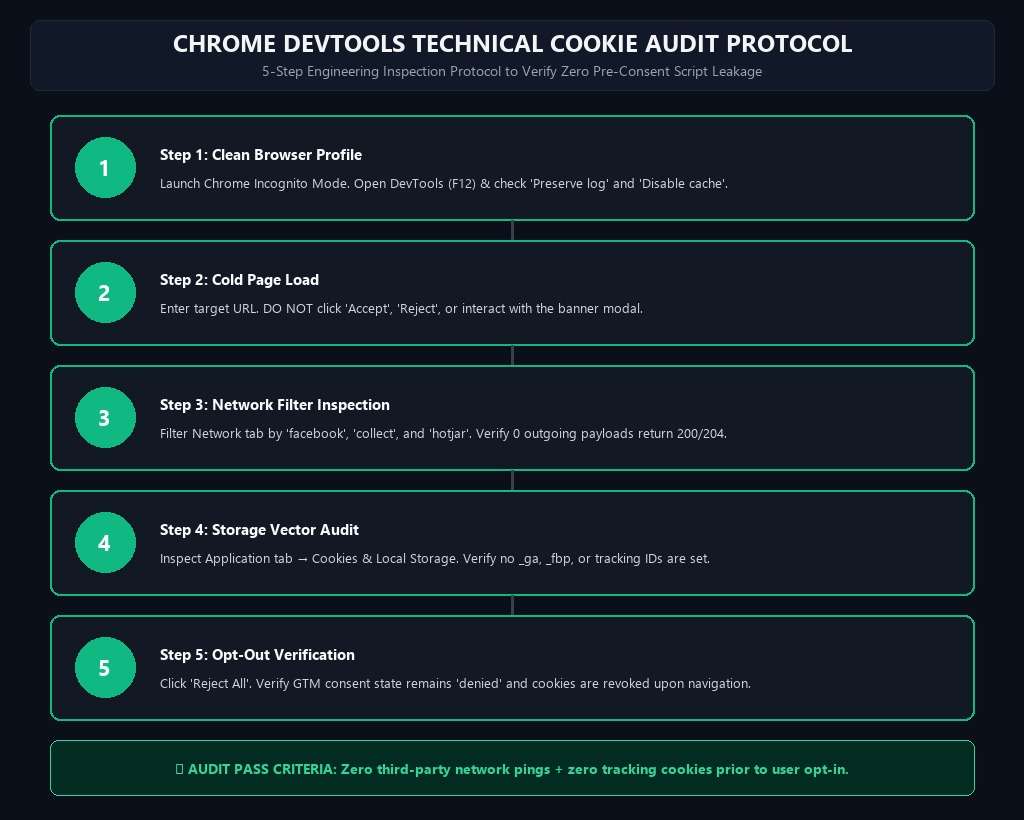
Description: Engineering audit flowchart detailing Chrome DevTools payload filtering and browser storage verification protocol.
Step 4: Inspect Specific Tracking Parameters
Click on individual outgoing network requests in DevTools and inspect the Payload or URL Parameters tab. Look for specific tracking tokens that litigators cite in CIPA wiretapping lawsuits:
gclid/fbclid: Google or Facebook Click Identifiers attached to landing page URLs.tid: GA4 Tracking ID (e.g.,G-XXXXXX). Inspect whethergcsshowsG100(denied consent) orG111(granted consent).gcd: Google Consent Mode v2 parameter string encodingad_storage,analytics_storage,ad_user_data, andad_personalizationstates.ep.anonymize_ip: Confirms whether IP anonymization is explicitly requested in unconsented telemetry pings.
Step 5: Audit Application Storage Vectors
Switch to the Application tab in DevTools. Under Storage, expand Cookies and Local Storage:
- Cookies: Check for active tracking cookies set on your domain (
_ga,_gid,_fbp,_gcl_au). Functional session cookies are permitted, but analytical or advertising cookies set prior to consent indicate a leak. - Local Storage & Session Storage: Inspect keys and values. Litigators actively cite pre-consent storage of visitor IDs in
localStorageas unauthorized data capture.
Step 6: Test Opt-Out & Revocation Workflows
Click “Reject All” on your cookie banner. Refresh the page or navigate to a secondary subpage. Verify that:
- No new tracking cookies are created.
- Existing third-party cookies are deleted or marked expired.
- GTM consent state remains set to
denied.
Technical Audit Checklist Matrix
Use this checklist during internal site audits to verify script suppression across all tracking categories:
| Asset / Category | Target Domains | Expected Pre-Consent Status | Verification Method |
|---|---|---|---|
| Analytics (GA4) | google-analytics.com | Cookieless Ping (G100) or Blocked | Network Tab: collect payload |
| Ad Pixels (Meta/TikTok) | facebook.com, tiktok.com | 100% Blocked (Zero network requests) | Network Tab: fbevents.js / /tr/ |
| Session Replay | hotjar.com, fullstory.com | 100% Blocked (No WebSocket connection) | Network Tab: WS / hotjar.js |
| Chat Widgets | intercom.io, driftt.com | Blocked or No Telemetry | Network Tab / Script Parsing |
| First-Party Cookies | yourdomain.com | Functional Session Cookies Only | Application Tab: Cookies (_ga must be absent) |
| Browser Storage | yourdomain.com | Zero Tracking Identifiers in localStorage | Application Tab: Local Storage |
Automated Script Scanners vs. Headless CLI Verification
While SaaS scanners (like BuiltWith or free online cookie checkers) provide high-level summaries, they often miss dynamic scripts loaded via inline GTM triggers, iframe widgets, or server-side script injections.
For enterprise environments, engineering teams write automated headless browser tests using Playwright or Puppeteer:
// Example Playwright Network Interception Audit Script
const { chromium } = require('playwright');

(async () => {
  const browser = await chromium.launch();
  const page = await browser.newPage();

  // Listen for outgoing requests before consent
  page.on('request', request => {
    const url = request.url();
    if (url.includes('facebook.com') || url.includes('hotjar.com')) {
      console.error(`❌ VIOLATION: Pre-consent request detected: ${url}`);
    }
  });

  await page.goto('https://yourdomain.com', { waitUntil: 'networkidle' });
  await browser.close();
})();
Manual DevTools inspection combined with automated CI/CD Playwright tests represents the gold standard for zero-leak privacy verification.
Frequently Asked Questions
What should I do if I find a tracking script firing before consent?
Immediately check where the script is embedded. If it is hardcoded in theme files (header.php or functions.php), remove it and route it through a GTM container configured with consent initialization triggers.
Why do some cookies persist even after I click “Reject All”?
First-party functional cookies (such as session tokens or security nonce tokens) are strictly necessary and do not require consent. However, if marketing cookies (_fbp, _gcl_au) persist, your CMP’s cookie revocation callback is not executing properly.
—
Want a professional engineering audit of your website’s tracking scripts? Our team provides comprehensive technical reviews through our ongoing website maintenance and compliance plans.


