

In March 2024, Google enforced Google Consent Mode v2 for all websites running Google Ads or using Google Analytics 4 telemetry. Sites that ignore this mandate lose access to audience remarketing lists and experience degraded Smart Bidding AI performance.
This guide is part of our comprehensive resource on Website Cookie Compliance, Privacy Litigation & Technical Script Blocking. Below, we explain how Consent Mode v2 works under the hood, detail its four core parameters, examine Server-Side GTM routing, and provide a step-by-step implementation roadmap.
What Is Google Consent Mode v2?
Google Consent Mode v2 is a signal-mapping framework that allows Google tags (GA4, Google Ads, Floodlight) to adjust their behavior dynamically based on user privacy choices.
Rather than binary execution (firing or not firing), Consent Mode v2 passes consent states to Google servers before and after a user interacts with a cookie banner.
When a user grants consent, Google tags write cookies and transmit full interaction data. When a user declines consent, Google tags do not store HTTP cookies or local storage data. Instead, they transmit anonymized, cookieless “pings” containing functional metadata (timestamp, device type, user agent). Google uses these unconsented pings to power AI conversion modeling, recovering up to 70% of conversion data that would otherwise be lost.
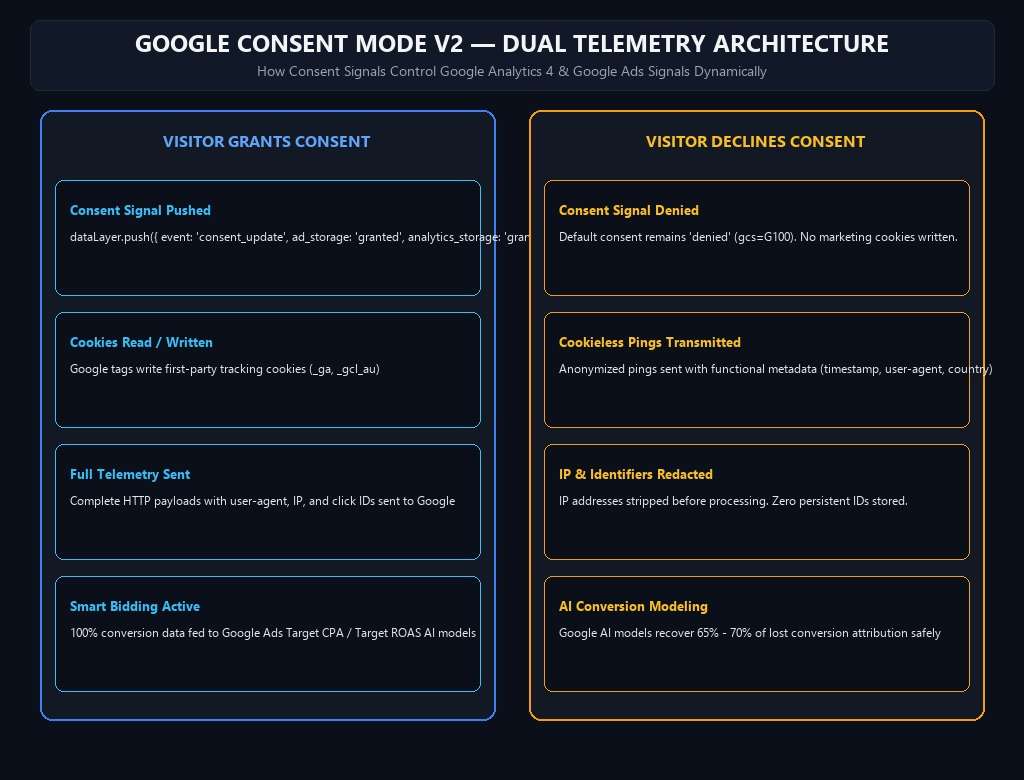
Description: Data flow comparison showing consented full cookie telemetry vs. cookieless pings used by Google AI for conversion modeling.
The 4 Core Consent Signals Explained
Consent Mode v2 expands upon v1 by adding two mandatory parameters driven by the European Union’s Digital Markets Act (DMA):
ad_storage(v1): Grants permission to read and write advertising cookies (_gcl_au,IDE).analytics_storage(v1): Grants permission to read and write first-party analytics cookies (_ga,_gid).ad_user_data(v2 Mandatory): Grants permission to transmit user-provided data (hashed email addresses, phone numbers) to Google for ad attribution.ad_personalization(v2 Mandatory): Grants permission to use visitor activity for personalized ad targeting and remarketing lists.
Impact on Google Ads Smart Bidding & Remarketing
Failing to transmit ad_user_data and ad_personalization signals severely degrades Google Ads campaign performance:
- Remarketing List Starvation: Google Ads automatically drops unconsented visitors from remarketing lists, Customer Match lists, and Similar Audience segments.
- Smart Bidding Blind Spots: Automated bidding strategies (Target CPA, Target ROAS, Maximize Conversions) rely on user-level signals to evaluate impression value. Without Consent Mode v2, Google Ads cannot verify whether a conversion originated from a ad click, causing bidding algorithms to overestimate acquisition costs and under-bid on high-value auctions.
Basic vs. Advanced Consent Mode Implementation
Google supports two implementation modes:
- Basic Consent Mode: Google tags are completely blocked until the user clicks “Accept”. If consent is denied, zero tags fire and no pings are sent to Google. Conversion modeling is disabled.
- Advanced Consent Mode: Google tags load immediately with default
deniedstates. Cookieless pings transmit basic attribution data to Google without reading or writing cookies. When the user accepts, GTM fires aconsent_updatesignal and tags transition to full tracking.
Advanced Consent Mode resolves the facade banner problem by allowing non-identifying conversion telemetry while remaining legally compliant.
Advanced Architecture: Server-Side GTM (sGTM) Integration
For enterprise applications requiring total data control, routing Consent Mode v2 signals through a Server-Side Google Tag Manager (sGTM) container provides an extra layer of privacy defense.
In an sGTM architecture:
- Client-side tags send encrypted requests to your first-party subdomain (e.g.,
metrics.yourdomain.com). - The sGTM server inspects the incoming consent payload (
gcsandgcdparameters). - If consent is
denied, sGTM automatically redacts client IP addresses, strips user-agent strings, and removes URL query parameters before forwarding the ping upstream to Google. - If consent is
granted, sGTM passes full attribution payload data to GA4 and Google Ads APIs via Conversion API (CAPI) endpoints.
Step-by-Step GTM Setup Guide
Setting up Consent Mode v2 via Google Tag Manager requires a four-step sequence:
Step 1: Define Default Consent States
Inject default consent parameters in the page head before the GTM container script loads:
<script>
  window.dataLayer = window.dataLayer || [];
  function gtag(){dataLayer.push(arguments);}

  gtag('consent', 'default', {
    'ad_storage': 'denied',
    'analytics_storage': 'denied',
    'ad_user_data': 'denied',
    'ad_personalization': 'denied',
    'wait_for_update': 500
  });
</script>
Step 2: Integrate a Certified CMP
Select an enterprise CMP using our guide on CMP platform selection and GTM integration. Certified CMPs automatically send consent state updates to dataLayer when visitors interact with the banner:
// Example CMP Consent Update Event
gtag('consent', 'update', {
  'ad_storage': 'granted',
  'analytics_storage': 'granted',
  'ad_user_data': 'granted',
  'ad_personalization': 'granted'
});
Step 3: Enable GTM Consent Overview
In GTM Settings, enable “Consent Overview”. Verify that every tag in your container has built-in consent checks configured for ad_storage and analytics_storage.
Step 4: Verify Signals in Tag Assistant
Open Google Tag Assistant, connect to your site, and inspect the “Consent” tab. Confirm that default consent states show denied upon initial load and update to granted after clicking “Accept”.
Frequently Asked Questions
What happens if I don’t implement Consent Mode v2?
Your website will continue to record standard GA4 traffic, but Google Ads will automatically block your remarketing lists, customer match uploads, and conversion modeling for users in regulated regions.
Is Advanced Consent Mode legal under strict privacy laws?
Yes. Cookieless pings do not read or store identifiers on the user’s device and do not transmit personal data, complying with ePrivacy and GDPR requirements when configured correctly.
—
Need assistance building a custom Consent Mode v2 architecture for your web application? Our engineering team specializes in GTM container configuration and server-side tracking integrations.


